


Simply Fleet: Fleet Management
3.912.00 Reviews
App Specs
- Version
- 111.5
- Updated On
- License
- Free
- Downloads
- 10,000+
- Developer
- Simply Fleet
- Categories
- Auto & Vehicles
- Platform
- Android
Screenshots

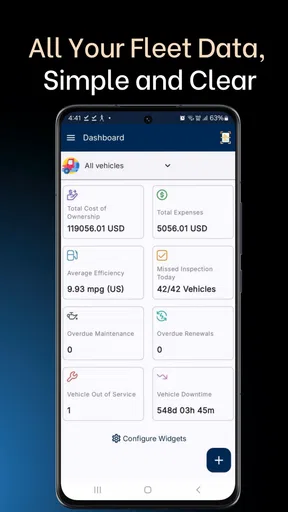
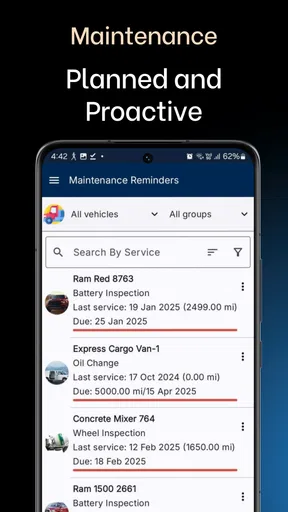
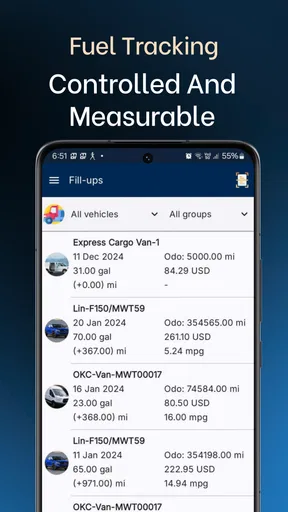
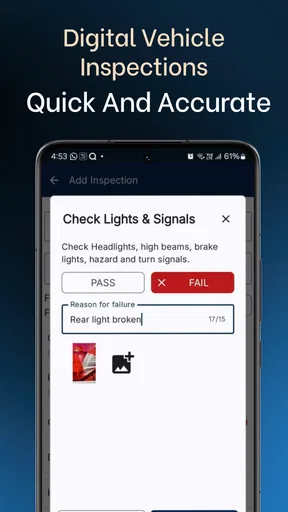
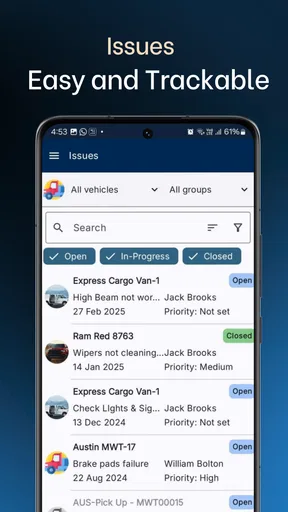
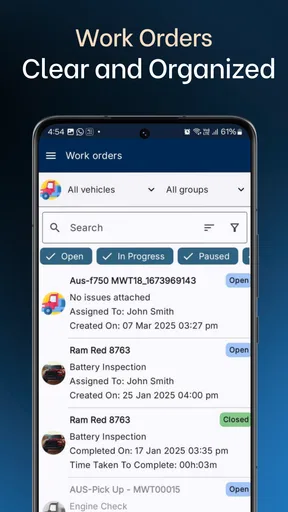
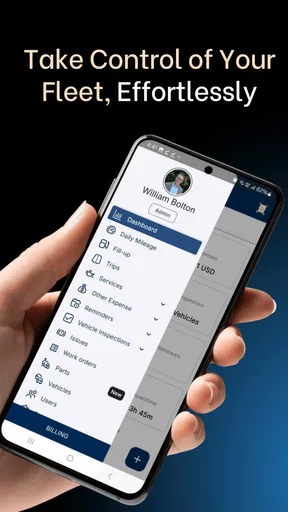
 Analysis by AppCompare
I find Simply Fleet most useful when fleet information needs to be gathered in one place rather than scattered across notebooks, messages, and spreadsheets. Its focus is practical: vehicle upkeep, inspections, fuel, inventory, and other day-to-day records. That makes it a more natural fit for a small business or team coordinating several vehicles than for someone who simply wants a personal driving log.
Because fleet work often happens away from a desk, the quality of the experience depends partly on being able to connect when a task needs recording or checking. I would think of it as a shared management tool, not as a substitute for a vehicle’s dashboard or a workshop’s own diagnostic equipment. The value is in keeping operational details organized, provided the people responsible for them actually enter and review those details.
When a connection matters
A manager may want to check a vehicle’s history before approving a repair, while a driver may need to complete an inspection at the start of a shift. Those moments are easier when the relevant information can be reached on a phone, but they also depend on a usable connection. In a yard, garage, or roadside location with weak service, I would avoid leaving an important record until the last minute. A sensible routine is to complete entries when the connection is reliable and confirm that the information is visible afterward.
That small habit matters because fleet records are only helpful when the people making decisions can see them. If a vehicle is due for attention, a manager should not assume that a reminder or a change has reached everyone without checking the shared record. This is especially worth bearing in mind when multiple people handle the same vehicle or when a shift handoff happens quickly.
Using it between jobs
The app’s strongest mobile use case is not necessarily watching a map all day; it is handling the small administrative moments that otherwise get postponed. A driver can deal with an inspection while the vehicle is parked, and someone overseeing the fleet can review a maintenance item between calls instead of waiting to return to a computer. I would keep entries concise and consistent: the same naming conventions for vehicles and clear notes about what needs follow-up make later searches and handoffs easier.
For example, imagine a delivery vehicle returning with a warning light on near the end of a busy shift. The practical next step is to record the issue and make it visible to whoever schedules maintenance, rather than relying on a hurried verbal reminder. The app can help keep that operational trail together, but it cannot judge how serious the warning is or replace a mechanic’s assessment. I would still follow the company’s safety procedure and arrange professional attention when needed.
Recovery and recordkeeping
Any app used for operational records deserves a little care around interruptions. If a screen does not load or a save is unclear, I would check the record before entering it repeatedly; duplicate fuel or maintenance entries can muddy reports just as much as missing ones. For a time-sensitive inspection, it is also sensible to follow the organization’s established fallback process if the phone or connection is unavailable, then reconcile the record once normal access returns.
Worth Reading Before You Choose

Baby Panda World Brings Quick Play to Modern Phones, but Its Game Library Feels Busy

ESPN’s Live Game View Makes Following Close Games Easier

QuizzLand Review: A Good Fit for Short Trivia Breaks, Not Every Player

Basketball Stars: Multiplayer Is Fast, but Can It Recover When Matches Go Wrong?

WEBTOON Turns Phone Updates Into a Better Reading Routine

Link to Windows Runs on Shared Habits, Not Social Feeds
That is not a knock against this particular tool so much as a realistic rule for mobile fleet administration. The app can organize information, but a fleet should not depend on one phone or one person remembering every detail. Managers can reduce that risk by agreeing who owns each type of entry, how urgent issues are escalated, and when records are reviewed. Those routines make any digital system more dependable.
Keeping data useful
Fuel and maintenance reporting become more meaningful when entries are complete and comparable. If one person records a fuel stop immediately and another waits until the end of the week, the figures may be harder to interpret. I would set a simple team standard for when to log receipts and how to describe repairs, then use the reports to spot questions worth investigating rather than treating a chart as a diagnosis. A sudden change may reflect a genuine operating issue, but it can also come from inconsistent input.
Inventory records benefit from the same discipline. A team that regularly checks what is available can use a shared record to avoid unnecessary purchases or last-minute searches, while a team that rarely updates it may find that the screen no longer reflects what is actually on hand. The useful insight here is that the app’s value grows with routine, not merely with the number of features in the menu.
Getting Started with Simply Fleet
I dove into Simply Fleet with a sense of curiosity. Right off the bat, the app greets you with a clean and intuitive interface. No fuss, no muss—just straightforward navigation that even a tech newbie can handle. Setting up your fleet is as easy as pie. You can add vehicles with all their nitty-gritty details: make, model, VIN, and more. Trust me, the app makes it feel less like work and more like a breeze.
Features That Make Life Easier
One of the things that really stood out to me is the maintenance tracking feature. You can schedule regular maintenance tasks and receive reminders, so you never miss a beat. It’s like having a personal assistant who’s got your back 24/7.
And let’s talk about fuel management. Keeping tabs on fuel usage can be a headache, but Simply Fleet simplifies it. Input your fuel receipts, and the app provides insightful reports that help you understand where your money is going. It’s all about making informed decisions without the stress.
Driver Management Done Right
Drivers are the backbone of any fleet, and managing them efficiently is crucial. Simply Fleet offers a nifty driver management system where you can assign vehicles, track performance, and even manage documents. It’s all there at your fingertips, and it makes coordinating with your team a whole lot smoother.
In practical terms, I would use those assignments as a coordination aid, not as a substitute for a clear handover. If a vehicle changes hands during the day, the incoming driver still needs to know about defects, unusual noises, or paperwork that needs attention. A short note in the record can make that handover less dependent on memory, while a direct conversation remains the safer choice for anything urgent.
Insights Galore
What really makes Simply Fleet shine is its analytics. The app generates detailed reports that help you keep an eye on your fleet's overall health. From fuel efficiency to maintenance costs, you get a clear picture of what's happening. It’s like having a crystal ball for your fleet operations.
That picture is most useful when you compare like with like. A vehicle used for short urban trips may consume fuel differently from one spending its day on longer roads, so I would be cautious about ranking drivers or vehicles without considering their work. The reports can help a manager decide what to inspect next, but the context behind a number still matters. I would treat analytics as a prompt for better questions rather than a verdict about performance.
Security and Support
In today’s world, data security is paramount. Simply Fleet takes this seriously, ensuring all your data is secure and accessible only to you. And if you ever run into any issues, their support team is just a message away—super responsive and ready to help.
Fleet records can include details that a business would not want casually shared, so I would be deliberate about who on the team is allowed to enter, edit, or review them. A tidy access routine is particularly important when staff roles change. I would also keep the information in the app relevant to fleet operations rather than treating it as a catch-all storage space for unrelated personal details.
If you’re wondering whether Simply Fleet fits your operational scale, the app is designed to accommodate fleets of various sizes. Whether you’re managing a handful of vehicles or a large fleet, the app scales beautifully.
Still, the right fit depends less on fleet size alone than on how the work is organized. A small company with several drivers, recurring service needs, fuel receipts, and inspection duties may get more from a central record than a larger operation with specialized dispatch, accounting, and telematics systems already in place. If your main need is live vehicle location or advanced route planning, I would compare dedicated tracking and dispatch tools before committing to a broader fleet-management workflow. This app makes more sense when maintenance and operating records are the priority.
What to expect before choosing
Simply Fleet is a free app in the auto and vehicles category, developed by Simply Fleet. It has a 3.9 average from around 300 ratings, with over 10,000 installs, and its content rating is Everyone. The app first appeared in June 2020; version 110.8 requires Android 6.0 or later. There are in-app purchases, with listed items ranging from around $10 to $330, so I would check what a particular plan includes before building a team workflow around it. The free download is a low-friction way to assess whether its approach suits your operation, but it does not mean every capability or team need will necessarily be covered without a purchase.
Compared with a spreadsheet, a dedicated fleet app gives the team a more structured place to maintain vehicle and activity records, while a spreadsheet may be easier to reshape for unusual reporting needs. Compared with a basic reminder app, Simply Fleet is aimed at several related tasks rather than a single service date. And compared with a specialized telematics platform, its appeal is the administrative side of fleet care, not an assumption that it will replace every tracking or dispatch system. I would choose it when reducing scattered records matters more than building a highly customized dashboard.
Before moving existing records into any new system, I would start with a small, clean pilot: add a few vehicles, agree on how inspections and fuel entries should be recorded, and see whether managers can find the information they need. That reveals friction early, including confusing vehicle names or inconsistent maintenance notes. Once the team has settled on a routine, expanding the record is less likely to create a pile of incomplete or duplicate entries.
Final Thoughts
Simply Fleet isn’t just another app; it’s a comprehensive solution for fleet management. It takes the stress out of the daily grind and gives you the tools you need to run a smooth operation. If you’re in the market for a fleet management app, give Simply Fleet a spin. You might just find it to be the trusty sidekick you’ve been searching for.
My recommendation comes with one practical condition: the team needs to keep its records current and have a plan for urgent issues when a phone or connection is not available. If that sounds manageable, the app can bring useful structure to recurring work. If your operation needs guaranteed real-time visibility, highly customized reporting, or a system built around complex dispatch, I would look at alternatives designed specifically for those priorities instead of expecting one general fleet tool to do everything.
Ready to take the plunge? You can download Simply Fleet for Android and iOS and start managing your fleet like a pro. Happy driving!
Pros
- User-friendly interface for quick navigation.
- Real-time vehicle tracking enhances monitoring.
- Comprehensive maintenance scheduling system.
- Detailed reports for better decision-making.
- Supports multiple vehicle types seamlessly.
Cons
- Limited offline functionality can be restrictive.
- Initial setup can be time-consuming.
- Higher-tier features require a subscription.
- Mobile app lacks some desktop features.
- Notifications can be overwhelming at times.
FAQs for Simply Fleet: Fleet Management
What platforms is Simply Fleet available on?
Simply Fleet is available for both Android and iOS devices. You can download it from the Google Play Store or the Apple App Store, ensuring compatibility with a wide range of smartphones and tablets. This accessibility makes it convenient for fleet managers who are on the go and need seamless integration with their mobile devices.
How does Simply Fleet help in managing my fleet?
Simply Fleet offers a comprehensive suite of tools for managing your fleet efficiently. It provides real-time tracking, maintenance scheduling, fuel management, and driver management. The app allows you to monitor vehicle performance and maintenance needs, ensuring that your fleet operates smoothly and cost-effectively, ultimately saving you time and money.
Is Simply Fleet user-friendly for beginners?
Yes, Simply Fleet is designed with a user-friendly interface that caters to both beginners and experienced users. The app includes intuitive navigation and clear instructions, which makes it easy for new users to quickly understand and utilize its features without feeling overwhelmed. This ensures a smooth onboarding process for all users.
Does Simply Fleet offer customer support?
Simply Fleet provides robust customer support to assist users with any issues or questions they may encounter. Support is available through various channels, including email and an in-app help section. Users can also access a comprehensive FAQ section and tutorials, ensuring they have the necessary resources to maximize the app's potential.
What are the main benefits of using Simply Fleet?
The main benefits of using Simply Fleet include enhanced efficiency in fleet management, reduced operational costs, and improved vehicle longevity. By offering detailed insights into fleet operations, the app helps managers make informed decisions. Features like automated maintenance reminders and fuel tracking contribute to better resource management and overall fleet performance.


